Sections / Gems / Image and video motion heroes
Prism Slats
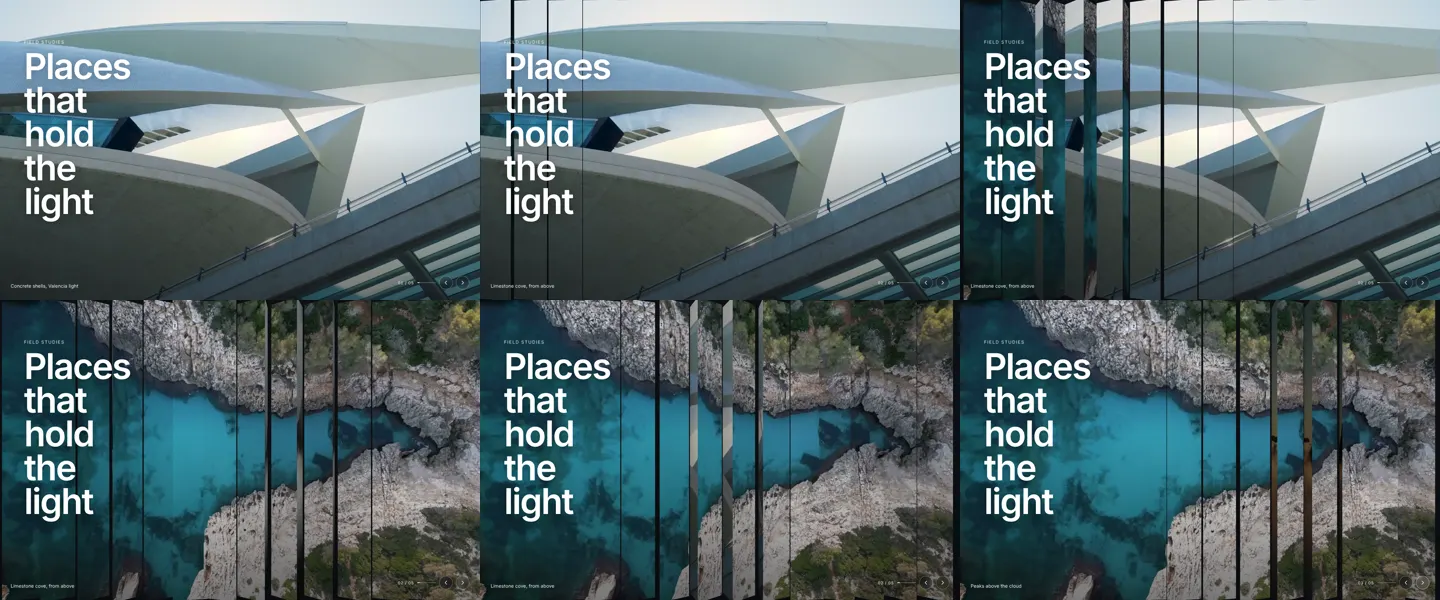
A full-bleed image hero cut into vertical three-sided slats. Each change turns the slats one face in a staggered wave, and the pointer drags a crease through them that shows a sliver of the previous and next image on either side. Pure CSS 3D and a few lines of script: no WebGL, no dependencies.
- Kind
- Image and video motion heroes
- Interaction
- autoplay · pointer crease · 3D slats · keyboard · swipe · carousel
- Dependencies
- None
- Licence
- Free for personal and commercial sites; do not resell the gem itself
Formats
- Webflow (native)
- Figma (layers)
- Framer component
- HTML
- Prompts for Claude Code, Cursor, Lovable, v0, Bolt
Copy to Webflow pastes a native section with the gem in an Embed inside it. Copy to Figma pastes a frame of its best moment, text and controls as layers. Copy to Framer pastes a component with its options as controls. HTML is one self-contained snippet. Each prompt (Claude Code, Cursor, Lovable, v0, Bolt) carries the exact files, so your agent installs this gem, not a lookalike. With the MCP server, ask your agent for get_section("prism-slats").
Behaviour and accessibility
- Pauses its autoplay while hovered or focused, and stops drawing entirely when off screen or in a background tab.
- Arrow keys change the image when focus is inside it; the arrow buttons are labelled; each change is announced politely to screen readers and the stage carries the current image's alt text.
- Swipe left and right on touch screens; the pointer crease is mouse and pen only.
- With prefers-reduced-motion: no autoplay, no crease, and a change cuts instead of turning.
- Anything you put inside the element (a headline, buttons) sits above the slats in a .psh-content layer.
Options
| Option | Type | Default | What |
|---|---|---|---|
slides | PrismSlide[] | 5 built in | The images, in order. Two or more. |
slats | number | 0 | Number of slats. 0 picks by width: 7 under 640 px, 11 under 1024 px, else 14. |
interval | number | 5200 | Milliseconds between changes; 0 turns autoplay off. |
duration | number | 1150 | Milliseconds one slat takes to turn. |
stagger | number | 55 | Milliseconds between neighbouring slats starting their turn. |
tilt | number | 48 | Largest twist under the pointer, in degrees. 0 turns the crease off. |
controls | boolean | true | Show the caption, counter, progress and arrow buttons. |
label | string | "Featured images" | Accessible name of the carousel. |
startIndex | number | 0 | Slide shown first. |
onChange | (index: number) => void | Called after every change with the new index. |

 Free