Sections / Gems / AI interaction primitives
Cadence Prompt
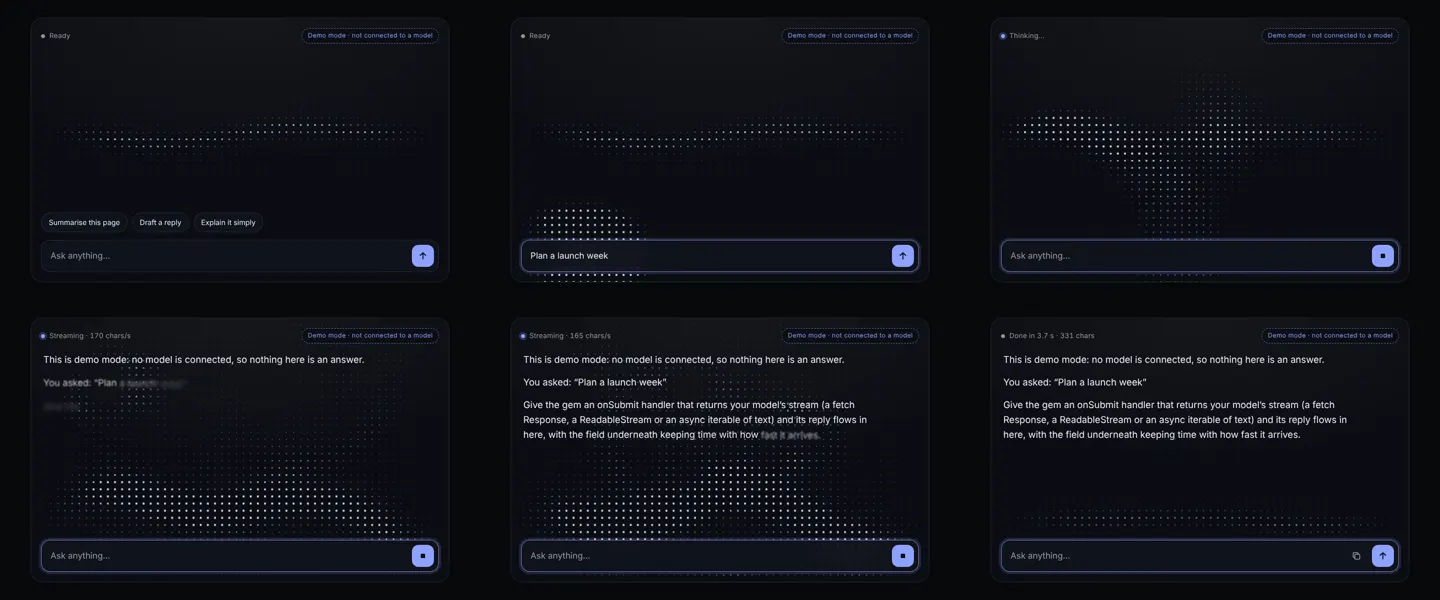
A prompt box for your own AI, set on a field of dots that keeps time with the conversation: keystrokes ripple out from the caret, a sweep runs while the model thinks, and while the reply streams the field turns into a wave whose height follows the real arrival rate, with a ripple wherever each chunk lands. Words settle in from a blur. Wire it to any model through one callback; without one it runs in a clearly labelled demo mode that only echoes the prompt.
- Kind
- AI interaction primitives
- Interaction
- streaming · typing ripples · stop and copy · keyboard · your model via callback · canvas
- Dependencies
- None
- Licence
- Licensed with Full Access, for the sites you build; do not resell the gem itself
Formats
- Webflow (native)
- Figma (layers)
- Framer component
- HTML
- Prompts for Claude Code, Cursor, Lovable, v0, Bolt
Copy to Webflow pastes a native section with the gem in an Embed inside it. Copy to Figma pastes a frame of its best moment, text and controls as layers. Copy to Framer pastes a component with its options as controls. HTML is one self-contained snippet. Each prompt (Claude Code, Cursor, Lovable, v0, Bolt) carries the exact files, so your agent installs this gem, not a lookalike. With the MCP server, ask your agent for get_section("cadence-prompt").
Behaviour and accessibility
- Enter sends, Shift+Enter adds a line, Escape or the Stop button aborts (the signal you got is aborted).
- The reply area is a polite live region that is marked busy while streaming, so screen readers read the finished reply once; the status line is a status role.
- Without onSubmit the gem shows a 'Demo mode · not connected to a model' badge and streams back an echo that says so. It never invents an answer.
- The field drops to a slow 10 fps shimmer when nothing is happening and stops entirely off screen or in a background tab.
- With prefers-reduced-motion: no ripples, sweep or wave, and words appear without the blur.
Wire it to your model
onSubmit(prompt, { signal }) returns your model's reply: a fetch Response (its streamed body is read as text), a ReadableStream, an async iterable of strings, or a plain string, sync or promised. Pass signal to fetch so Stop cancels the request. The reply is shown as plain text with paragraphs on blank lines.
Options
| Option | Type | Default | What |
|---|---|---|---|
onSubmit | (prompt: string, ctx: CadenceContext) => CadenceStream | Promise<CadenceStream> | Your model. Return a fetch Response, a ReadableStream, an async iterable of text, or a string (sync or promised). Leave unset for the labelled demo mode. | |
onDone | (text: string, stats: CadenceStats) => void | Called when a reply finishes, is stopped or fails. | |
placeholder | string | "Ask anything…" | Placeholder in the empty box. |
label | string | "Message the assistant" | Accessible label of the box. |
suggestions | string[] | 3 built in | Prompts offered as buttons while the box is empty. |
accent | string | "#8ea2ff" | Colour of the field and the accents. |
theme | 'dark' | 'light' | "dark" | dark or light. |
demoLabel | string | "Demo mode · not connected to a model" | Text of the badge shown in demo mode. |
 Free