Sections / Gems / Image and video motion heroes
Darkroom
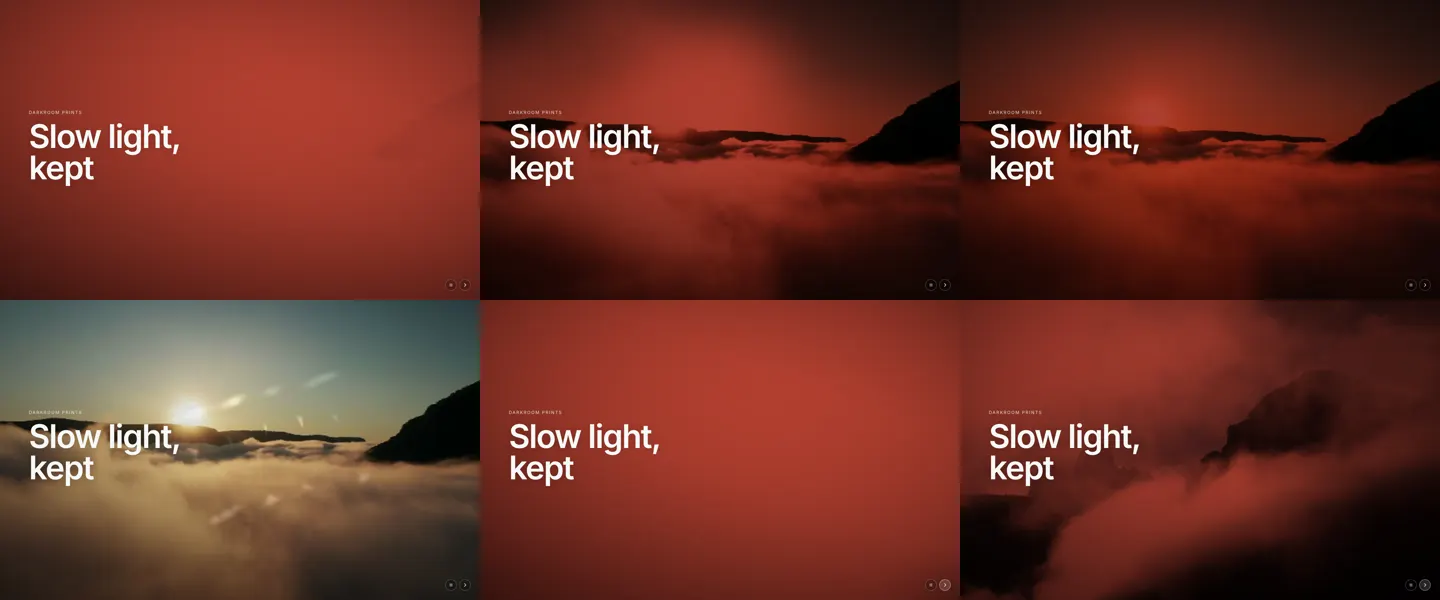
A hero photograph that develops in front of you. The print starts as blank paper in a tray of developer under a red safelight; the darks come up first, then the midtones, a little unevenly, the way a real print does, while the liquid rocks over it. When it is done the room lights come on and the true colours show; after a while the next print takes its place. Move the pointer and it sloshes the developer.
- Kind
- Image and video motion heroes
- Interaction
- autoplay · develops on view · pointer ripples · WebGL · pause and next · images
- Dependencies
- None
- Licence
- Licensed with Full Access, for the sites you build; do not resell the gem itself
Formats
- Webflow (native)
- Figma (layers)
- Framer component
- HTML
- Prompts for Claude Code, Cursor, Lovable, v0, Bolt
Copy to Webflow pastes a native section with the gem in an Embed inside it. Copy to Figma pastes a frame of its best moment, text and controls as layers. Copy to Framer pastes a component with its options as controls. HTML is one self-contained snippet. Each prompt (Claude Code, Cursor, Lovable, v0, Bolt) carries the exact files, so your agent installs this gem, not a lookalike. With the MCP server, ask your agent for get_section("darkroom").
Behaviour and accessibility
- The first print develops as soon as its photograph has loaded and the hero is on screen; the next follows after the hold time.
- The print area is an image with the current photograph's alt text; the pause and next buttons are labelled.
- Moving the mouse or pen sloshes the developer; touch screens get the rocking liquid without the ripples.
- Paused on a finished print, nothing is drawn; everything stops off screen or in a background tab.
- With prefers-reduced-motion: the photograph is shown developed, in room light, still; the next button swaps it at once.
- Anything you put inside the element (a headline, buttons) sits above the print in a .dkr-content layer.
Options
| Option | Type | Default | What |
|---|---|---|---|
photos | DarkroomPhoto[] | 3 built in | The photographs, in order. Landscape images fill a hero best. |
develop | number | 3800 | How long a print takes to develop, in ms. |
hold | number | 5200 | How long a finished print stays before the next, in ms; 0 keeps the first. |
pointer | boolean | true | The pointer sloshes the developer (mouse and pen). |
controls | boolean | true | Show the pause and next buttons. |

 Free